Presets · WebGL
Ulam Spiral
Watch Ulam Spiral live in the browser
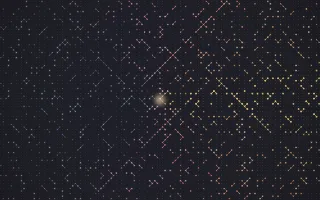
The whole numbers are written on a square grid, starting at the centre and winding outward in a square spiral. Every prime is lit and every other number is a faint dot. Joined to their diagonal neighbours, the primes form the diagonal chains Stanislaw Ulam noticed in 1963 while doodling during a talk.
The music flows out along the spiral: each moment's spectrum is written at the centre and carried outward ring by ring. Direction picks the frequency, bass to the east and treble to the west, so each prime glows with the band passing it. Every few kicks the spiral restarts from another number, such as 41, and the pattern rearranges.
What it reacts to
- Spectrum: written at the centre and carried outward, lighting the primes by band (bass on the right, treble on the left)
- Kick drum: twin primes, pairs such as 11 and 13, flash white
- Every few kicks: the spiral restarts from a new starting number
- Snare: brightens the primes as its moment travels outward
- Bass pulses: the prime dots and the source at the centre swell
Tune
Flow speed sets how fast the spectrum travels outward, Kicks per shift sets how many kicks pass before the spiral restarts from a new number, and Composites colours the dots of the non-prime numbers.
Music that suits it
A steady kick under a busy spectrum, as in techno or house, keeps the twin primes flashing and the spiral regularly reorganising; the flow stops in silence.
How to play it
Install Deus, play music on Spotify, YouTube Music, Yandex Music or any other tab and click the Deus icon on that tab. Then pick Ulam Spiral in the WebGL presets, or press ← → on the page until it comes up.