Presets · WebGL
Event Horizon
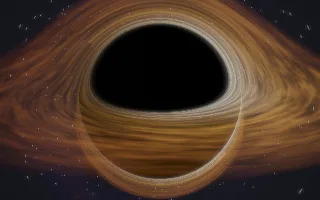
Watch Event Horizon live in the browser
A black hole seen from a slowly orbiting camera. Its accretion disc is a hot, streaked ring of gas, and the light from the far side of the disc is bent up over the top of the black shadow, the way gravitational lensing draws it in photographs and films of black holes. Stars and a faint nebula fill the background.
Each ray of light is integrated step by step through the exact photon equation for a Schwarzschild (non-rotating) black hole; rays that fall inside the horizon form the shadow. The disc turns faster near its inner edge, as Kepler's law demands, and the side moving towards the camera is brighter and bluer, an effect called Doppler beaming.
What it reacts to
- Bass: the disc heats from orange towards white and its inner edge creeps closer to the hole
- Kick drum: the whole disc flares, harder when the bass is strong
- Mids: the disc spins faster
- Overall loudness: brightens the disc and moves the camera along its slow orbit, which stops in silence
Tune
Disc heat sets how hot the gas burns, and Inclination tilts the view from nearly edge-on to looking down on the disc.
Music that suits it
Slow, bass-heavy music with clear kicks, such as dub, trip-hop or deep techno, keeps the disc white-hot and makes it flare on the beat.
How to play it
Install Deus, play music on Spotify, YouTube Music, Yandex Music or any other tab and click the Deus icon on that tab. Then pick Event Horizon in the WebGL presets, or press ← → on the page until it comes up.