Presets · WebGL
Hilbert Spectrogram
Watch Hilbert Spectrogram live in the browser
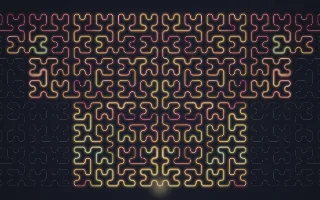
Two 32 by 32 Hilbert curves, mirrored and joined at the bottom centre, form one path that visits every cell of the screen. Each cell along the path holds one moment of the music: the present enters at the bottom centre and older moments travel outward along the curve, up to 1,024 steps of history.
A Hilbert curve is a space-filling curve that keeps moments close in time close in space, so a song's sections show up as coherent regions rather than scattered lines. The glowing line is thick where a moment was loud and coloured by its spectral balance, from crimson for bass-heavy moments through amber and jade to ice blue for bright ones. History only advances while music plays.
What it reacts to
- Loudness: sets each moment's line thickness and brightness, and how fast history flows along the curve
- Spectral balance: colours each moment, from crimson (bass) to ice blue (treble)
- Kick drum: leaves a white-hot knot that travels along the curve
- Snare: leaves a pale blue bead on the line
- Bass hits: thicken the line and brighten the entry point and the curve's hairline
Tune
Flow speed sets how quickly history travels along the curve, Ribbon width scales the line, and Curve colours the faint hairline of the path.
Music that suits it
Songs with clear contrasts between sections, such as electronic tracks with breakdowns and drops, leave distinct blocks of colour and width along the curve.
How to play it
Install Deus, play music on Spotify, YouTube Music, Yandex Music or any other tab and click the Deus icon on that tab. Then pick Hilbert Spectrogram in the WebGL presets, or press ← → on the page until it comes up.