Presets · WebGL
Bubble Chamber
Watch Bubble Chamber live in the browser
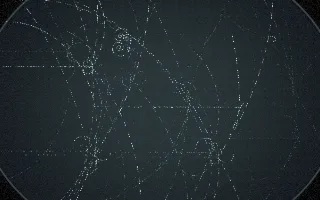
A dark, round chamber window with fiducial crosses, like a photograph from a 1960s particle-physics experiment. Each hit on the beat is a collision: a beam particle enters from the left and breaks up into a spray of tracks drawn as rows of tiny bubbles.
In the chamber's magnetic field a charged particle moves on a circle whose radius is set by its momentum, and as it loses energy the circle tightens into a spiral; positive and negative charges curl in opposite directions. Fast particles run almost straight, slow ones wind up tight. Some collisions also produce a neutral particle that leaves no trail until it decays into a V of two opposite curls, and small delta electrons curl off the main tracks.
What it reacts to
- Kick drum: a full collision with an incoming beam track, flashing the chamber lamp
- Snare: about half of snares make a smaller event with fewer tracks
- Loudness and the mid spectrum at the moment of a hit: more tracks with more energy
- Treble against bass at the hit: treble-heavy hits give faster, straighter tracks, bass-heavy ones tighter spirals
- Overall loudness: old tracks fade faster while music plays; in silence the film holds still
Tune
Magnetic field sets how tightly tracks curl, Persistence how long they stay on the film, and Glow the colour of fresh tracks.
Music that suits it
Music with distinct kicks and snares, such as breakbeat, drum and bass or techno, fills the film with overlapping events.
How to play it
Install Deus, play music on Spotify, YouTube Music, Yandex Music or any other tab and click the Deus icon on that tab. Then pick Bubble Chamber in the WebGL presets, or press ← → on the page until it comes up.