Presets · WebGL
Pulsar Ridges
Watch Pulsar Ridges live in the browser
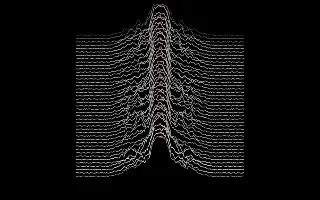
Several dozen thin white lines are stacked one above another on black, each a jagged profile with peaks standing up in the middle, and each line hides the ones behind it. New lines enter at the bottom, and the stack climbs as older lines fade out at the top.
The layout comes from the stacked plots of successive radio pulses from CP 1919, the first known pulsar, discovered in 1967; the chart later became a well-known album cover. Here each line is one moment of the spectrum mirrored about the centre, bass in the middle and higher bands toward the sides, with flat, noisy flanks like a receiver's baseline. The tallest peaks take on an accent colour.
What it reacts to
- Spectrum: each new line is the current spectrum, bass at the centre and treble toward the sides
- Loudness: new lines are added faster; in silence the stack stops
- Kick drum: the newest lines flash brighter
- Snare: a smaller flash on the newest lines
Tune
Lines sets how many traces are stacked (30 to 60), Peak height scales the peaks, Scroll speed sets how quickly new lines are pushed in, and Accent color tints the tallest peaks.
Music that suits it
Music with strong, changing low and mid content over steady drums, such as post-punk, techno or drum-heavy rock, builds tall, varied ridges that climb at an even pace.
How to play it
Install Deus, play music on Spotify, YouTube Music, Yandex Music or any other tab and click the Deus icon on that tab. Then pick Pulsar Ridges in the WebGL presets, or press ← → on the page until it comes up.