Presets · WebGL
Paper Marbling
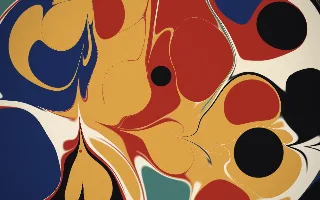
Watch Paper Marbling live in the browser
A sheet of Turkish ebru marbling builds up on a cream bath: round drops of indigo, madder red, ochre, verdigris, cream and black push the earlier paint aside, and straight strokes of a stylus or comb drag the colours into feathered bands.
It follows Aubrey Jaffer's mathematics of marbling. Floating paint never mixes, and each gesture is an exact, area-preserving map of the plane: a drop pushes every point outward from its centre, a tine shifts paint along its line by an amount that falls off with distance. To colour a pixel the shader walks backwards through the recent drops and strokes. Each gesture spreads in over about a second and a half, then the paper holds perfectly still until the next one.
What it reacts to
- Kick drum: every third kick drops paint, sometimes several at one spot as a bull's-eye; the kicks in between press a soft light into the paper
- Bass: bigger drops
- Snare: every third snare drags a single tine or a comb through the bath, alternating direction
- Overall loudness: longer strokes and slightly larger drops
Tune
Drop size scales the paint drops, Tine strength how far strokes drag the paint, and Bath sets the background colour.
Music that suits it
Music with a clear kick and backbeat snare at a moderate tempo, such as hip-hop, downtempo or rock, lets each drop and stroke settle before the next.
How to play it
Install Deus, play music on Spotify, YouTube Music, Yandex Music or any other tab and click the Deus icon on that tab. Then pick Paper Marbling in the WebGL presets, or press ← → on the page until it comes up.