Presets · WebGL
Cyclic Automaton
Watch Cyclic Automaton live in the browser
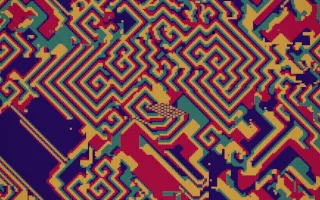
A field of 256 by 144 cells, each holding one colour from a cycle; a cell moves on to the next colour when enough of its neighbours already hold it. From random noise the field forms blotches, then small self-sustaining loops of colour, and finally rotating spiral waves that tile the plane.
This is David Griffeath's cyclic cellular automaton. The rule, made of range, threshold, number of colours and neighbourhood shape, decides the look, and the preset moves between six of them, including the classic 14-colour spirals, perfect four-colour spirals, the jagged 313 rule and a turbulent eight-colour phase. Each colour is tied to a slice of the spectrum, and cells that have just advanced glow along the wave fronts.
What it reacts to
- Loudness: drives the step clock, so the spirals turn as fast as the music is loud and stop in silence
- Kick drum: plants a pinwheel, the core of a new spiral, sized by the bass
- Snare: splashes a patch of noise for the spirals to digest
- Every few dozen kicks: a new rule is chosen and the whole field reorganises
- Spectrum and treble: each colour brightens with its slice of the spectrum, and the treble makes the wave fronts flare
Tune
Speed scales the step rate, Kicks per rule sets how many kicks pass before the rule changes (40 by default), and Tint replaces one colour of the cycle.
Music that suits it
Steady four-on-the-floor music such as house or techno keeps the spirals turning and seeds new cores on the kicks, while snare-heavy tracks stir in more noise.
How to play it
Install Deus, play music on Spotify, YouTube Music, Yandex Music or any other tab and click the Deus icon on that tab. Then pick Cyclic Automaton in the WebGL presets, or press ← → on the page until it comes up.