Presets · WebGL
Night City
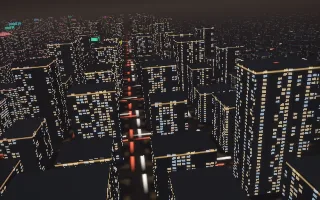
Watch Night City live in the browser
The camera flies slowly down an avenue over a city at night. Dark towers carry rows of lit windows and a coloured band under each roof, red lights sit on the tallest roofs, and the streets below carry streams of white headlights and red tail lights.
The skyline is an equalizer laid out in space: each avenue of towers belongs to one of 32 frequency bands, bass on the left and treble on the right. Towers on an avenue rise with their band and light more of their windows, so a bass line lifts one side of the city and cymbals the other. The city is raymarched block by block at half resolution, with a soft bloom over the brightest lights.
What it reacts to
- Spectrum: each tower rises with its band, lights more windows and brightens the band under its roof
- Loudness: the flight and the traffic move faster, and the headlights grow brighter
- Kick drum: billboards on some towers flash, in a new colour on each hit
Tune
Tower height scales the skyline, Altitude sets how high the camera flies, and Window light sets the warm colour of the windows.
Music that suits it
Music with energy spread across the whole spectrum and a clear kick, such as synthwave, house or hip-hop, raises both sides of the skyline and keeps the billboards flashing.
How to play it
Install Deus, play music on Spotify, YouTube Music, Yandex Music or any other tab and click the Deus icon on that tab. Then pick Night City in the WebGL presets, or press ← → on the page until it comes up.