Presets · WebGL
Kruskal
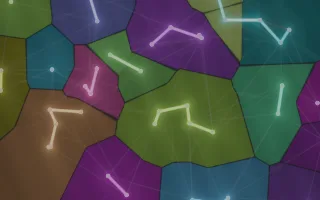
Watch Kruskal live in the browser
Forty points scattered over a dark stained-glass window, each the centre of its own coloured pane. One by one, glowing edges join neighbouring points, panes take on each other's colour as they join, and edges that would close a loop flash red and fade, until a single tree connects every point and the whole window is one colour.
This is Kruskal's algorithm for a minimum spanning tree. Candidate edges are tried from shortest to longest: an edge joining two separate groups is kept and the groups merge, while an edge whose ends are already connected would make a cycle and is rejected. The panes are the Voronoi cells of the points, the areas closest to each one.
What it reacts to
- Spectrum at the start of a run: each point is thrown further from its lattice position the louder its frequency band, and bass adds to the scatter
- Overall loudness: drives the clock that tries one edge per tick; silence pauses the build
- Kick drum: once the tree is complete, the next kick scatters new points; points swell briefly on each kick
- Spectrum: each pane shimmers with its band; bass thickens the tree edges
Tune
Build speed sets how quickly edges are tried, Scatter how far the music throws the points, and Lead lines the width of the dark borders between panes.
Music that suits it
Steady, full-sounding music with a regular kick, such as house or pop, keeps the build moving at an even pace and restarts it promptly.
How to play it
Install Deus, play music on Spotify, YouTube Music, Yandex Music or any other tab and click the Deus icon on that tab. Then pick Kruskal in the WebGL presets, or press ← → on the page until it comes up.