Presets · WebGL
Puzzle Cube
Watch Puzzle Cube live in the browser
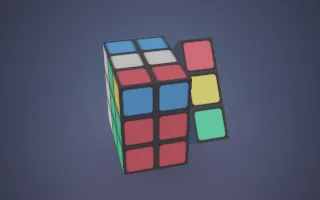
A 3×3×3 puzzle cube with red, orange, white, yellow, green and blue stickers turns one face at a time in a softly lit space while the camera circles it. After a run of scrambling turns it reverses course and solves itself, glows briefly when solved, then starts over.
The 54 stickers are a real cube state rather than a picture. Each quarter turn is applied as a permutation of the stickers in that face's slab, so the cube follows the actual group of cube moves and every pattern on screen is one a physical cube could show. The scramble is a music-seeded sequence of quarter turns, and the solve replays their inverses in reverse order.
What it reacts to
- Kick drum: starts the next quarter turn and makes the turning face flare; without drums, turns still come slowly
- Loudness: drives the turn animation and the camera orbit; silence freezes the cube, even mid-turn
- Bass: the camera moves in and the background and the solved glow brighten
- Treble: the stickers sparkle and their highlights sharpen
Tune
Turn speed sets how quickly each turn plays, Scramble length sets roughly how many turns a scramble has, and Orbit speed sets how fast the camera circles.
Music that suits it
Music with a steady four-on-the-floor kick, such as house or techno, gives the cube an even rhythm of turns.
How to play it
Install Deus, play music on Spotify, YouTube Music, Yandex Music or any other tab and click the Deus icon on that tab. Then pick Puzzle Cube in the WebGL presets, or press ← → on the page until it comes up.