Presets · WebGL
Nebula
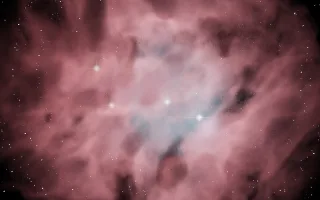
Watch Nebula live in the browser
A glowing gas cloud seen from close by as the camera slowly circles it: a thick shell blown open by a cluster of young stars, dust lanes in front that absorb and redden the light, and background stars with diffraction spikes.
The colours follow the emission lines astronomers use for narrowband images: hydrogen-alpha red in the outer gas, doubly ionised oxygen teal near the hottest star, and sulphur gold at the ragged edges. The gas is a volume of fractal noise, raymarched at reduced resolution and smoothed when shown, with the stars drawn sharp on top.
What it reacts to
- Bass: lights the hydrogen red
- Mids: light the oxygen teal around the central star
- Treble: lights the sulphur fringes and makes the stars twinkle
- Kick drum: a new star flares somewhere in the cloud and a blue-white shock front sweeps out through the gas
- Hi-hat and loudness: brighten the cluster stars; the camera only drifts while music plays
Tune
Gas density sets how thick and bright the gas is, Camera drift sets how fast the camera circles, and Newborn stars sets how strong the kick-born stars and their shock fronts are.
Music that suits it
Ambient or cinematic music with a slow pulse suits its pace, while electronic tracks with a full spectrum and a regular kick light all three gases and keep new stars igniting.
How to play it
Install Deus, play music on Spotify, YouTube Music, Yandex Music or any other tab and click the Deus icon on that tab. Then pick Nebula in the WebGL presets, or press ← → on the page until it comes up.