Presets · WebGL
Pixel Sort

Watch Pixel Sort live in the browser
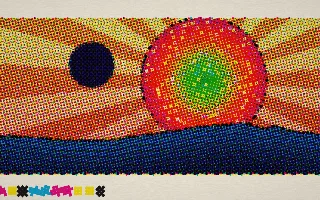
A simple painted scene, a sky gradient, a large sun and a dark skyline drawn from the spectrum, is gradually smeared into long streaks of sorted colour, so the picture breaks into bands of light running in one direction.
Pixel sorting is a glitch-art technique popularised by Kim Asendorf: along each row or column, runs of pixels brighter than a threshold are reordered by brightness. Here the sort really runs on the GPU, as steps of odd-even transposition sort on a half-resolution image, so the streaks grow visibly frame by frame. The source picture keeps seeping back in, which feeds new streaks, and in silence the sort stops and the image holds.
What it reacts to
- Loudness: recent energy lowers the threshold, so more of the picture smears, and the sun grows
- Loudness: more sort steps run per frame, so streaks grow in pulses with the beat
- Spectrum: the skyline at the bottom is the spectrum, bass in the middle
- Kick drum: melts a band of lines back to the picture and pushes the colour channels apart; every few kicks the sort turns to a new direction
Tune
Threshold sets how bright a pixel must be to be sorted, Turn every N kicks sets how often the sort changes direction, and Sort speed sets how many sort steps run per frame.
Music that suits it
Electronic tracks with long build-ups and drops show the picture melting into streaks as the energy rises and settling as it falls, while a regular kick keeps turning the sort.
How to play it
Install Deus, play music on Spotify, YouTube Music, Yandex Music or any other tab and click the Deus icon on that tab. Then pick Pixel Sort in the WebGL presets, or press ← → on the page until it comes up.