Presets · WebGL
Penrose Tiling
Watch Penrose Tiling live in the browser
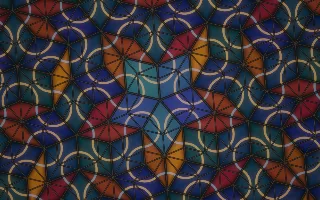
A Penrose tiling of thick and thin rhombi, drawn as stained glass with dark lead lines, slowly turns and zooms in and out. Ribbons of gold and ice-blue arcs cross the tiles and join into curves and rings that follow the tiling's fivefold order.
Penrose's P3 tiling covers the plane without ever repeating. Here it is built exactly by deflation: a wheel of ten half-rhomb triangles is split again and again by the golden ratio, and each pixel follows only the triangle that contains it. As the plane zooms, the edges of one generation dissolve into the diagonals of the next, and every sixteen kicks by default the tiling eases one deflation deeper, then back again.
What it reacts to
- Spectrum: each of the ten tile kinds (two shapes in five orientations) glows with its own slice of the spectrum
- Kick drum: sends a ring of light outward from the centre of the tenfold star; counted kicks trigger the deflation step
- Mids and treble: brighten the arcs, the mids on thick rhombi and the treble on thin ones
- Bass hits: light a thin bright core inside the lead lines
- Loudness: drives the rotation and zoom of the plane
Tune
Tile size sets the scale of the tiles, Arcs the strength of the ribbon arcs, and Kicks per deflation how many kicks pass between deflation steps.
Music that suits it
Melodic electronic or orchestral music with a broad spectrum lights all ten kinds of tile, while a regular kick sends rings across the glass.
How to play it
Install Deus, play music on Spotify, YouTube Music, Yandex Music or any other tab and click the Deus icon on that tab. Then pick Penrose Tiling in the WebGL presets, or press ← → on the page until it comes up.