Presets · WebGL
ASCII Torus
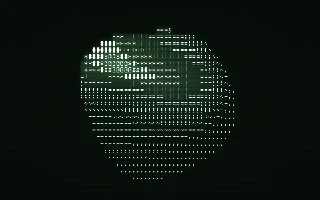
Watch ASCII Torus live in the browser
A solid turning on a green phosphor terminal, drawn entirely in text characters, from a sparse dot in the shadows to a dense @ where the light hits. Scanlines and a soft glow complete the old monitor look.
It is a modern take on the well-known spinning ASCII donut programs. Every character cell sends one ray at a small 3D scene, the shaded brightness picks a glyph from the ramp " .,-~:;=!*#$@", and each glyph is drawn from a built-in 5 by 7 pixel font. The solid is one of five, a torus, an octahedron, two interlocked rings, a rounded cube and a spiky ball, and it melts smoothly from one to the next.
What it reacts to
- Overall loudness: turns the solid, faster when louder, and it stands still in silence; also brightens the phosphor
- Kick drum: after every set number of kicks (32 by default) the solid melts into the next shape; each kick adds a faint flare
- Treble: raises the spikes on the spiky ball
Tune
Rows sets the size of the character grid, New shape every N kicks sets how often the solid changes, and Phosphor sets the screen colour.
Music that suits it
Steady, beat-driven music with a regular kick, such as synthwave, chiptune or house, keeps it turning and changing shape every few bars.
How to play it
Install Deus, play music on Spotify, YouTube Music, Yandex Music or any other tab and click the Deus icon on that tab. Then pick ASCII Torus in the WebGL presets, or press ← → on the page until it comes up.