Presets · WebGL
Ringed Planet
Watch Ringed Planet live in the browser
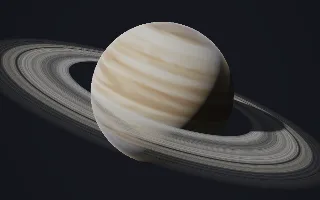
A banded gas giant hangs in a starfield beside a wide, tilted ring system. Cream, butterscotch and rust belts shear past each other, three oval storms turn in the clouds, the planet casts its shadow across the rings and the rings cast theirs on the cloud tops.
The scene is ray-traced analytically, a sphere for the planet and a plane for the rings. The atmosphere is a stack of zonal bands, each latitude tied to a frequency band from bass at the equator to treble at the poles, and turbulence is sheared along them by differential rotation, faster at the equator. The rings' density profile is the spectrum itself, 32 bands from the inner edge outward, so gaps open where a band falls quiet. In silence the planet stands still.
What it reacts to
- Spectrum: cloud belts brighten and warm with their bands, and ringlets thicken or open into gaps
- Bass: the storms swell
- Kick drum: lightning flashes inside one of the storms, brightest on the night side
- Mids: sharpen the sheared detail in the belts
- Loudness: drives the cloud rotation and the camera's drift around the planet
Tune
Camera drift sets how fast the view circles the planet, Ring contrast sets how sharply quiet bands open gaps in the rings, Storms scales how much the storms show and swell, and Planet tint colours the middle tone of the belts.
Music that suits it
Music with a wide, changing spectrum, such as orchestral, progressive rock or ambient electronica, keeps the rings and belts shifting, while a steady kick fires the lightning.
How to play it
Install Deus, play music on Spotify, YouTube Music, Yandex Music or any other tab and click the Deus icon on that tab. Then pick Ringed Planet in the WebGL presets, or press ← → on the page until it comes up.