Presets · WebGL
Liquid Tunnel
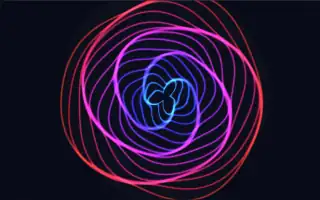
Watch Liquid Tunnel live in the browser
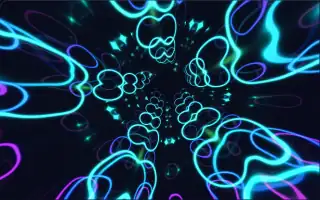
Eighteen thin, glowing rings nested around the centre of the screen, each one wobbling into soft three- and five-lobed shapes as it turns. Their colours run from green through cyan and blue towards violet and slowly cycle, and a soft glow sits in the middle. Faint trails left by each frame give the motion a liquid feel.
The look recalls the classic MilkDrop visualizer, where nested shapes and fading feedback read as a tunnel. Here each ring is tied to one part of the spectrum: inner rings to the low frequencies, outer rings to the high ones.
What it reacts to
- Spectrum: each ring pushes outward and brightens with its own band, low bands on the inner rings and high on the outer
- Bass: the rings spread wider and thicken, and the central glow grows
- Overall loudness: brightens the central glow
Music that suits it
Melodic electronic music with a full spectrum and a solid bass line, such as synth-pop or trance, keeps every ring moving.
How to play it
Install Deus, play music on Spotify, YouTube Music, Yandex Music or any other tab and click the Deus icon on that tab. Then pick Liquid Tunnel in the WebGL presets, or press ← → on the page until it comes up.