Presets · WebGL
Deus
Watch Deus live in the browser
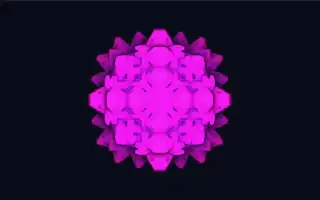
A glowing fractal seen head-on: a folded, crystalline form whose edges shine in saturated colour against a dark field, its hue shifting slowly over time. It is the preset the extension takes its name from.
The shape is a kaleidoscopic fold fractal: space is mirrored, sorted, rotated and scaled again and again, up to twenty times, and the result is raymarched. Rays that miss still gather light from how close they came, which gives the soft halo. The folds drift on a clock that only runs while music plays, so the form keeps evolving without jumping.
What it reacts to
- Overall loudness: adds fold iterations, so loud passages bring out finer detail and quiet ones simplify the form
- Bass and bass pulses: the fractal grows and the view zooms in
- Mids: a second accent colour spreads from the core
- Treble: brightens the glow, and sharp treble hits nudge the hue
- Attacks: the whole form briefly expands
Tune
Base evolution speed sets how fast the folds drift while music plays.
Music that suits it
Dynamic music shows it best, since quiet passages strip the fractal down and loud ones fill it with detail; orchestral and electronic tracks with builds both work well.
How to play it
Install Deus, play music on Spotify, YouTube Music, Yandex Music or any other tab and click the Deus icon on that tab. Then pick Deus in the WebGL presets, or press ← → on the page until it comes up.