Presets · WebGL
Wake Up
Watch Wake Up live in the browser
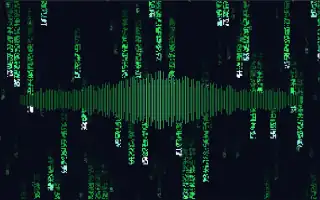
Columns of green glyphs fall down a black screen in two layers, each glyph drawn on a small 5×7 dot grid, with bright heads and fading trails, in the manner of the falling code from science-fiction film. Through the middle runs a horizontal band of 180 thin vertical spikes.
The band is a mirrored spectrum: bass sits at the centre and higher frequencies spread out to both sides, each spike reaching up and down from the midline with its band's level and a small random variation in height. Where the band rises it cuts through the falling code. The rain falls at a fixed pace; the music changes how bright it is, not how fast it falls.
What it reacts to
- Spectrum: the spikes stretch with their bands, bass in the middle
- Loudness: the falling glyphs grow brighter
- Bass hits: brighten the rain and lift the central spikes
- Treble hits: the spike tips glow and turn a lighter green
Music that suits it
Music with a strong, defined bass line and crisp highs, such as electronic, industrial or hip-hop, stretches the band at the centre and sharpens its tips.
How to play it
Install Deus, play music on Spotify, YouTube Music, Yandex Music or any other tab and click the Deus icon on that tab. Then pick Wake Up in the WebGL presets, or press ← → on the page until it comes up.