Presets · WebGL
Oscilloscope Ribbons
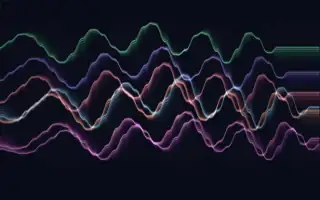
Watch Oscilloscope Ribbons live in the browser
Seven thin glowing lines run across the screen one above another, each tracing the current waveform of the music like the beam of an oscilloscope. Every ribbon reads the waveform at a slightly shifted position and wobbles on its own slow cycle, so together they form a loose, layered band in a spread of hues that rotates over time.
Each frame fades rather than clears, leaving short trails behind the ribbons. Points of light slide along the lines and flare where the wave is steep. In silence the colours drain to grey and the lines lie almost flat.
What it reacts to
- Waveform: shapes every ribbon directly
- Loudness: increases the height of the waves
- Bass: thickens the lines and their haze, and bass hits lengthen the trails
- Mids: brighten the ribbon colours
- Treble: makes sparks flare on steep parts of the wave and shifts their accent colour
Music that suits it
Sparse music with clear tones, such as solo piano, voice or minimal electronic, keeps the waveform readable, while dense mixes turn the ribbons into a jagged band.
How to play it
Install Deus, play music on Spotify, YouTube Music, Yandex Music or any other tab and click the Deus icon on that tab. Then pick Oscilloscope Ribbons in the WebGL presets, or press ← → on the page until it comes up.