Presets · WebGL
Radial Spectrum
Watch Radial Spectrum live in the browser
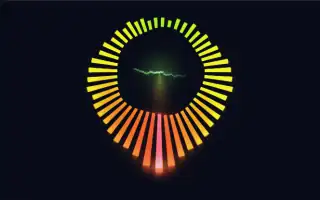
The classic circular analyser: 48 bars radiate from a ring, mirrored left and right, with the bass at the bottom and the treble at the top. Each bar has a glowing tip and a soft aura, and a thin spectrum line runs across the middle of the ring.
The colours cycle slowly round the colour wheel, the treble end of the ring shifted away from the bass end. A broad glow pools beneath the ring with the low end, and a small core glow sits at the centre. It is a direct, readable view of the spectrum rather than an abstract scene.
What it reacts to
- Spectrum: sets each bar's length, low frequencies at the bottom, high at the top
- Bass and bass pulses: the ring widens, the lower bars jump and the glow beneath it grows
- Waveform: ripples the spectrum line in the middle
- Treble pulses: shift the colour of the upper bars
- Overall loudness: brightens everything
Music that suits it
Anything with a full spectrum works, from pop to drum and bass; bass-heavy tracks make the lower half pump.
How to play it
Install Deus, play music on Spotify, YouTube Music, Yandex Music or any other tab and click the Deus icon on that tab. Then pick Radial Spectrum in the WebGL presets, or press ← → on the page until it comes up.