Presets · WebGL
Wireframe Cube
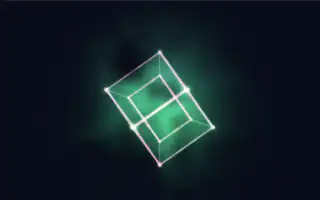
Watch Wireframe Cube live in the browser
A single cube stands on one corner in the middle of the screen and turns steadily about its vertical axis, drawn as glowing wireframe edges with a smaller cube nested inside and linked to it at the corners. Its faces are filled with faint hatched glass, and a coloured fog breathes behind it.
The hue drifts slowly around the colour wheel, points of light scan along the edges, and each of the six faces takes its own slice of the spectrum. The motion is deliberately plain: the cube grows a little on the bass and glows with the loudness, while the rotation keeps a constant pace.
What it reacts to
- Bass and lowest bins: swell the cube and thicken its edges
- Spectrum: each of the six faces brightens and shifts hue with its own band
- Loudness: brightens lines, faces and fog, and speeds the scanning points
- Mids and treble: shift the hue, and the treble also brightens the corners and the fog
Music that suits it
Bass-driven pop and electronic music makes the cube pulse clearly, while a broad, full mix lights all six faces.
How to play it
Install Deus, play music on Spotify, YouTube Music, Yandex Music or any other tab and click the Deus icon on that tab. Then pick Wireframe Cube in the WebGL presets, or press ← → on the page until it comes up.